
Showing posts with label computers. Show all posts
Showing posts with label computers. Show all posts
Friday, May 4, 2012
Recovering a failed hard drive. Part II, the solution
Getting SpinRite to start working is really easy. With the burnt CD inside the CD drive, all one has to do is turn the computer on, with the intended hard drive to recover connected, and wait some time. A welcome screen with clear options tells you what you need to press for which operations, and off you go.
SpinRite has different “levels” of operation, for different functions. The default and recommended level is level 2, which will scan the contents of the disk and attempt to recover whichever sectors are damaged or unreadable. I chose this option and let it go. At first, the scan seemed to go quite fast. Obviously the scanned parts were healthy and were duly being skipped. After about 12 hours of operation, the screen was telling me it was 2.89% done, trying to repair the first bad sector… at which point I understood it was going to take a while, lost interest, and turned the screen off. I let it work for around 12 hours before I checked on it again.


Sunday, April 22, 2012
Recovering a failed hard drive. Part I, the problem.
Two weeks ago I was going through old computer parts I stored in a box when I came across 6 defunct hard drives. What I mean by defunct is that the data inside them is not accessible any more for a bunch of different reasons. Data loss is one of the nightmares of any computer user, and all hard drives will eventually fail: it's not a matter of IF, but a matter of WHEN. Since I've had personal computers for more than ten years, it only makes sense that I have a fair collection of failed hard drives.
 |
| The problem |
Monday, March 5, 2012
The struggle to keep online privacy
As social networks and smartphones advance, it seems that privacy recedes into an ever shrinking pocket of the online experience. While ten years ago it was hard to find out someone's email address and with that perhaps his username at a certain forum, today a dedicated stalker can get all kinds of information about someone with very little effort.
 Google is in the headlines because as of past thursday their new privacy policies kicked in, which in a nut shell claim to be aimed at offering a better experience to the user by suggesting relevant ads and interesting videos, for example, based in their searches, visited websites, etc. While one could see the advantage of this, many question what would happen if this sort of information fell in the wrong hands. Others ask why is there no way to opt-out of this tracking, which is active whenever someone's logged into any of the many services Google offers, including Gmail, YouTube and Google+. The reality is that this sort of data has always been collected and used to show advertisements (how else would a company who spends millions in infrastructure and offers mostly free services to the public make money?), and the only change is that instead of having around 60 privacy policies for each of their services, they have a unified one to better understand their target audiences and market their ads better. If you're concerned about what's being gathered, click on this link and find out, by accessing the Google dashboard.
Apple is also on the radar since there seem to be some apps that can access users' photos with the excuse of looking at "location information" in these files. With smartphones not only storing important information about contacts but also about GPS generated locations, this could be a little more dangerous than simple advertising. A deceivingly harmless looking application could be transmitting user location data to someone or something, and that's worrying. Of course the only thing Apple can do is ask app developers to add a privacy policy of sorts so users have to agree to it before using the software, but that doesn't quite work since almost nobody takes the time to read them.
Whatever these two giants will do to counter the accusations, only one thing is clear: as our lives get more and more digital, our privacy disappears slowly but steadily.
 Google is in the headlines because as of past thursday their new privacy policies kicked in, which in a nut shell claim to be aimed at offering a better experience to the user by suggesting relevant ads and interesting videos, for example, based in their searches, visited websites, etc. While one could see the advantage of this, many question what would happen if this sort of information fell in the wrong hands. Others ask why is there no way to opt-out of this tracking, which is active whenever someone's logged into any of the many services Google offers, including Gmail, YouTube and Google+. The reality is that this sort of data has always been collected and used to show advertisements (how else would a company who spends millions in infrastructure and offers mostly free services to the public make money?), and the only change is that instead of having around 60 privacy policies for each of their services, they have a unified one to better understand their target audiences and market their ads better. If you're concerned about what's being gathered, click on this link and find out, by accessing the Google dashboard.
 |
| Tracking data from an iPhone |
Whatever these two giants will do to counter the accusations, only one thing is clear: as our lives get more and more digital, our privacy disappears slowly but steadily.
Thursday, November 24, 2011
Internet passwords
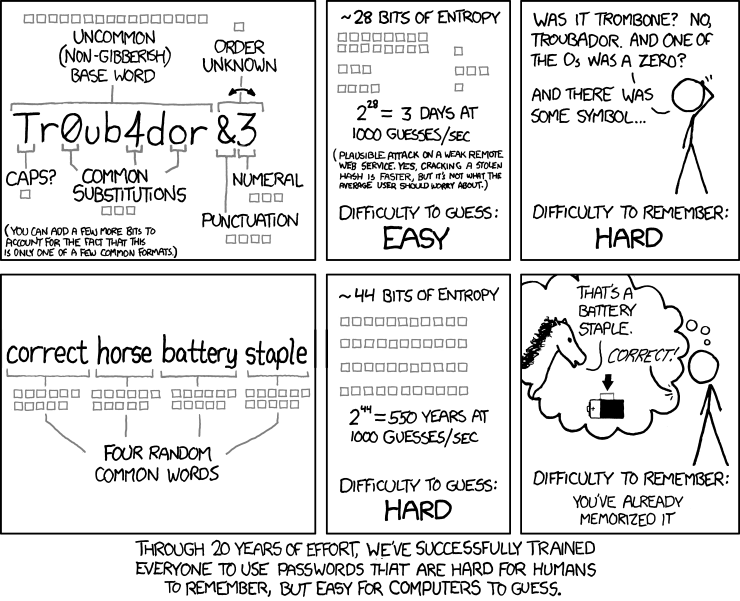
I am beginning to get pissed off about the requirements of some websites when you're creating a new account, when it comes to choosing your password. It's getting to a point where all the symbols on the keyboard must to be used, which makes passwords really hard to remember.
I admit they make them really hard to guess, but whoever uses passwords that are "guessable" deserve to be hacked in the first place.
It's really easy to come up with a password that is only letters and that sticks to your head.
heymanitsmeletmein -> Secure, easy to forget, hard to guess, hard to find by brute force.
Randy22# -> Hard to remember, although secure online, easy to crack by brute force if it's a local file.
What's more, websites advise you to never repeat a password. So if I'm signed up to half a dozen forums, three email services, online banking, two gaming portals and wikipedia, how many upper-lower-case-number-and-symbol passwords can I remember before I forget one and have to go through the process of "recover your password" just to forget that one the next day as well?
Passwords should be whatever you want, and as such, at your own risk if they are too easy to guess. If you use your dog's name as the key to your important stuff, then it's your fault for being stupid when some guy signs in and starts sending spam to all your contacts.
I finish my rant with the classic XKCD strip that wraps it all up perfectly:
 |
| This isn't the worst I've seen... |
I admit they make them really hard to guess, but whoever uses passwords that are "guessable" deserve to be hacked in the first place.
It's really easy to come up with a password that is only letters and that sticks to your head.
heymanitsmeletmein -> Secure, easy to forget, hard to guess, hard to find by brute force.
Randy22# -> Hard to remember, although secure online, easy to crack by brute force if it's a local file.
What's more, websites advise you to never repeat a password. So if I'm signed up to half a dozen forums, three email services, online banking, two gaming portals and wikipedia, how many upper-lower-case-number-and-symbol passwords can I remember before I forget one and have to go through the process of "recover your password" just to forget that one the next day as well?
Passwords should be whatever you want, and as such, at your own risk if they are too easy to guess. If you use your dog's name as the key to your important stuff, then it's your fault for being stupid when some guy signs in and starts sending spam to all your contacts.
I finish my rant with the classic XKCD strip that wraps it all up perfectly:
Saturday, July 2, 2011
Fear 3
Well, hello July; the summer is already letting itself be felt and what other way to celebrate it than... locking myself in my room and playing some scary first person shooter.
I admit I have been a little lax in terms of posting; although I've been busy, the blame falls on me being lazy under summer heat.
So without further ado, Fear 3.
It must be one of the most awaited sequels this year and finally it's here. Before I go on, truth be told, Fear 1 and 2 haven't made their way to my computer hard drive. With that in mind it's pretty obvious the story went right by me.
With a game called 'fear' my first reaction was to open my windows and let the sunshine in, light some candles and put a teddy bear on top of my monitor so everything seemed less scary. Then I found my balls which I had lost and closed the door, closed the window, pumped the volume up and fired the game.
The environment that greeted me was not very scary at first, when compared to other games I've played in the past, getting out of a prison is not such a big deal. Then you start seeing things here and there, you wonder if you really seen them, if you're imagining things or if it's a graphical glitch. Most of what you see however is meant to be there and to start playing with your head, something this game does quite adequately.
As the levels progress you find more disturbing imagery. I wasn't sure if my character was losing it's mind or if it was me. Easy enough to trouble shoot: stopped the game walked around the house and realized it wasn't covered in blood nor there were little dead girls showing up out of nowhere, so it had to be the game. By the third level things like this greeted me:
What I've said before about being busy lately is not entirely a lie so I genuinely haven't had a chance to finish the game, nor did I write this review as early as I was planning, but I can say I find it engaging and makes me want to complete it, which is always a good thing to say about a game.
Technically it's not pushing many boundaries, specially with it's graphics or gameplay mechanics, they're adequate. There's a slow motion button that lets you take well aimed shots at zombies' heads, which is very satisfying. You can play as two characters, or so it seems, which makes me think this game fully supports cooperative mode. It's not my main way to play games however so I can't give you an insight into that. The sound is well done and it scares you at the right places. If you have a surround sound system then this can be one ... spine chilling experience altogether.
More games reviews to come this week.
Friday, May 6, 2011
How-to: Download videos from YouTube
Something a lot of people have asked me is "How do you download videos from YouTube?".
Well here's a quick and simple guide on how to.
This first method uses Firefox. If you don't use Firefox yet, I recommend you get it over HERE.
First of all, we need to open the Add-ons browser. You can open it by hitting Control+Shift+A, or manually:

A window with a lot of suggestions will pop up, but just go to the search field and write downloadhelper , then hit Enter. You will be shown a series of results, but it's usually the first one:

Hit install on the right hand side of the screen, and it should start downloading and installing. Wait for the process to be complete, it shouldn't take longer than a minute. Firefox will tell you it needs restarting, so hit Restart Now:

When it opens again, you should see the add-ons manager still open. Open a new tab, and you will notice a little button with something that looks like a flower on the left of your address bar. Now, all you have to do is go to the YouTube video you want to download and then hit the little arrow next to that icon. It will show a bunch of different versions of the video you can download, for the different resolutions. Usually you want to download the best resolution one:

In this example, you'd want to get the 720p one. The program will then ask you where to save the file. Select the folder you want (or the desktop, so you can easily find it and organize it later). Hit OK, and that's it, it's downloading.
Also it's worth mentioning that this add-on works for a lot of other websites that use video. If you see that little flower spinning, it means DownloadHelper has detected video and is ready to download it.
This second method doesn't require Firefox. It involves a website that does pretty much the same thing as the previously mentioned add-on.
First, go to the YouTube video you want to download. Copy the address from the address bar:

Then go over to this site: http://keepvid.com/ and paste the address you just copied into the URL field, then hit Download.

If this is your first time visiting, you might get a warning message like this:

Trust me, there's nothing to be afraid of, so click "Always trust content from this publisher" and then Run.
After a bit you will be presented again with all the resolutions you can download. Click the one you want (again I recommend the highest resolution) and it will show you the download dialog.

Click download, choose where you want to save the file, and you're done!
Next week, I teach you how to hack into the FBI servers.
Well here's a quick and simple guide on how to.
This first method uses Firefox. If you don't use Firefox yet, I recommend you get it over HERE.
First of all, we need to open the Add-ons browser. You can open it by hitting Control+Shift+A, or manually:
- For the latest version of Firefox, go to your Firefox menu, and click Add-ons.
- For previous versions (or if you enabled the tool bar), it is located under the Tools menu, then click Add-ons.

A window with a lot of suggestions will pop up, but just go to the search field and write downloadhelper , then hit Enter. You will be shown a series of results, but it's usually the first one:

Hit install on the right hand side of the screen, and it should start downloading and installing. Wait for the process to be complete, it shouldn't take longer than a minute. Firefox will tell you it needs restarting, so hit Restart Now:

When it opens again, you should see the add-ons manager still open. Open a new tab, and you will notice a little button with something that looks like a flower on the left of your address bar. Now, all you have to do is go to the YouTube video you want to download and then hit the little arrow next to that icon. It will show a bunch of different versions of the video you can download, for the different resolutions. Usually you want to download the best resolution one:

In this example, you'd want to get the 720p one. The program will then ask you where to save the file. Select the folder you want (or the desktop, so you can easily find it and organize it later). Hit OK, and that's it, it's downloading.
Also it's worth mentioning that this add-on works for a lot of other websites that use video. If you see that little flower spinning, it means DownloadHelper has detected video and is ready to download it.
This second method doesn't require Firefox. It involves a website that does pretty much the same thing as the previously mentioned add-on.
First, go to the YouTube video you want to download. Copy the address from the address bar:

Then go over to this site: http://keepvid.com/ and paste the address you just copied into the URL field, then hit Download.

If this is your first time visiting, you might get a warning message like this:

Trust me, there's nothing to be afraid of, so click "Always trust content from this publisher" and then Run.
After a bit you will be presented again with all the resolutions you can download. Click the one you want (again I recommend the highest resolution) and it will show you the download dialog.

Click download, choose where you want to save the file, and you're done!
Next week, I teach you how to hack into the FBI servers.
Subscribe to:
Posts (Atom)